
 Community
 Video Library
 Agent Training
 Freshservice
 Freshdesk
 Freshchat
 Freshcaller
 Freshsales
 Freshteam
 Freshworks Neo
 Freshsurvey
Freshworks sent you this email because a login attempt was detected from a location that does not match your recent login history. This is a security measure to help protect your account.
TABLE OF CONTENTS
If the login was you
Complete these steps to finish signing in:
Return to the Freshworks login screen where you entered your credentials.
Open the email with the subject Unusual Login Attempt Detected - Verify Your Account.
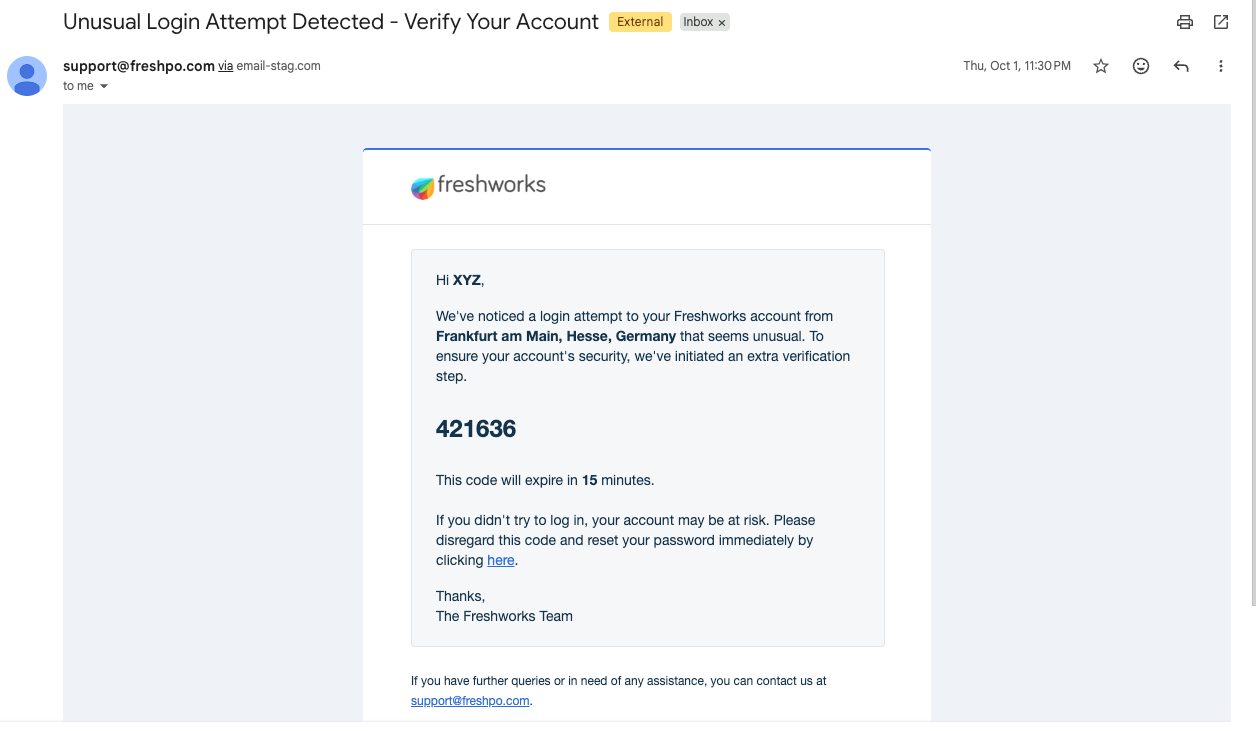
Enter the verification code from the email on the login screen.
Complete sign-in before the code expires.
The email includes the location of the login attempt so you can confirm it was yours.
Note: Even if you use an authenticator app or SMS for MFA, Freshworks sends an email verification code for suspicious login attempts. Check your registered email address.
Why did I receive this email?
You may receive this email when you:
Log in from a new country or state.
Use a VPN that changes your apparent location.
Travel to a location you have not used to sign in before.
After you successfully verify a location, Freshworks remembers it as part of your login history. You are less likely to receive another verification email from that location in the future.
If the login was not you
Do not enter the verification code. Take these steps immediately:
Select the Reset password link in the verification email, or reset your password from your account settings.
Sign out of Freshworks on all devices if you are currently signed in.
Contact your organization administrator to report the unauthorized login attempt.
Important: Do not share your verification code with anyone. Freshworks will never ask you for this code outside of the login screen.Troubleshooting
I did not receive the verification email
Check your spam or junk folder.
Confirm that the email was sent to your registered Freshworks account address.
Wait a few minutes and request a new code by attempting to sign in again.
My verification code expired
Verification codes expire after a limited time. Start the sign-in process again to receive a new code.
I keep receiving verification emails from the same location
If you regularly sign in from a location that triggers verification, contact your organization administrator. They can work with Freshworks support to review your account settings.